You left your dog home alone and spent the next three hours refreshing a notification feed, getting zero useful information. Or you bought a camera with great specs, only to find it keeps dropping off your Wi-Fi every time your dog so much as sneezes near the router. Either way, you’re here because you want real oversight — not a security theater box that looks reassuring on your shelf.
The good news: the pet camera market has genuinely matured. Budget cameras now pull 1080p at prices that feel almost suspiciously low. Pan-and-tilt motors mean you can follow a zoomy Lab around the living room from your desk. Some cameras toss treats, some bark at intruders, some identify your dog specifically by “unusual behavior.” The bad news: Wi-Fi dropouts, mandatory subscriptions, pan/tilt motors that die after six months, and motion detection that alerts you every time a shadow moves are all live problems across this category. Knowing which tradeoff you’re actually signing up for is the whole game here.
This guide covers ten cameras that routinely show up as bestsellers in the Dogs > Cameras & Monitors category, with honest analysis of who each one is right for — and who will regret buying it.
How We Read This List
Recommendations are based on Amazon bestseller placement, product listing details, buyer feedback patterns, and available review text. Where review themes are mentioned, they reflect customer feedback summaries and sample reviews rather than personal hands-on testing by our team. We note where signals are strong versus thin. Visual observations are limited to what is shown or described in listings and specifications. Star-distribution breakdowns were not available, so we reference tone and themes qualitatively. Price tiers reflect the Amazon marketplace and can change.
Quick Picks
- Best budget-friendly dog monitor, zero frills: TP-Link Tapo C100 — clear picture, low price, no subscription
- Best pan-and-tilt for under budget tier: Kasa EC70 or TP-Link Tapo C200 — both track movement without a subscription
- Best treat-tossing pet-specific camera: Furbo 360° Dog Camera — purpose-built for dogs, but factor in the subscription cost
- Best for 4K clarity + no subscription: Eufy E30 Indoor Camera — highest resolution in this group, HomeKit support
- Best for Roku households: Roku Indoor Camera 2-Pack — integrates with your existing Roku TV setup
- Best for someone who wants a smart display, not just a camera: Amazon Echo Show 5 — doubles as a Alexa hub, but it’s not a dog-monitoring replacement
Buying Guide: What to Know Before You Pick a Dog Camera
Fixed vs. Pan/Tilt
A fixed camera shows you one corner of a room. If your dog sleeps in three spots and you don’t know which one, you’ll spend a lot of time staring at an empty couch cushion. Pan/tilt cameras — the Kasa EC70, Tapo C200, Blink Mini Pan-Tilt, Eufy E30, and Furbo 360° — let you sweep the room remotely. The tradeoff: pan/tilt motors are a mechanical part that can fail. Buyer feedback across this category show pan-and-tilt failure as one of the most commonly reported long-term issues.
Subscriptions vs. Local Storage
This is the most important financial decision in this category. Several cameras are essentially “bricked” without an active subscription — the Furbo 360° is the clearest example. Others, like the Kasa EC70 and Eufy E30, let you record continuously to a microSD card with zero monthly fees. Before you buy, ask: do I want to pay for this camera every month indefinitely?
Wi-Fi and Connectivity
Every camera in this category uses 2.4GHz Wi-Fi. If your router is in a different room or you have a crowded 2.4GHz band, expect drop issues. The single most repeated complaint across nearly all cameras here is “randomly stops connecting.” Position matters. A Wi-Fi extender near the camera zone is often the real fix.
Resolution and Night Vision
1080p is now the minimum viable standard. The Eufy E30 is the only 4K option in this group. Night vision via infrared is standard; color night vision (Eufy E30, Roku Indoor) is genuinely better for identifying what your dog is actually doing at 2 a.m.
Pet-Specific Features vs. General Security Cameras
Most cameras here are repurposed home security cameras. They work fine for watching your dog but don’t have bark detection, anxiety alerts, or treat dispensing. The Furbo 360° is the only purpose-built pet camera in this group. If pet-specific AI alerts matter to you, that distinction is worth the subscription cost comparison.
Safety Note
If your dog has a known anxiety disorder or medical condition that you’re monitoring via camera, discuss camera-based monitoring (and treat dispensers) with your veterinarian. Remote treat tossing sounds fun but can create unintended feeding patterns in dogs with dietary restrictions. For general behavioral guidance, the ASPCA’s dog behavior resources are a solid starting point. The AKC also covers separation anxiety in practical terms.
Common Questions Before Buying
Can a dog camera help separation anxiety?
It can help you observe patterns, but it does not treat anxiety by itself. Treat tossing can even become a problem for dogs with diet restrictions.
Do dog cameras need subscriptions?
Some useful features, like cloud recording or smart alerts, may require paid plans. Check what works without a subscription before buying.
What matters more than video resolution?
App stability, night vision, alert accuracy, privacy controls, and whether the treat mechanism jams matter more in daily use than headline resolution.
Related Resources
- Related Review: Best Dog DNA Tests for Breed ID, Health Screening, and Rescue Dogs - Useful when you are comparing dog health fit, upkeep, safety, and long-term cost.
- Related Review: Best Dog GPS Trackers for Escape Artists, Hiking, and No-Subscription Needs - Useful when you are comparing dog health fit, upkeep, safety, and long-term cost.
- Related Review: Best Dog Prescription Medication Services and Vet-Approved Pet Med Options - Useful when you are comparing dog health fit, upkeep, safety, and long-term cost.
- Related Review: Best Styptic Powders and Gels for Dog Nail Bleeding and Grooming Kits - Useful when you are comparing dog health fit, upkeep, safety, and long-term cost.
- Authority Reference: AKC dog health guide - General health background for monitoring and care decisions.
Comparison Table
| Product | Best For | Standout Upside | Buyer Caution | Skip If |
|---|---|---|---|---|
| TP-Link Tapo C100 | First-time dog owners on a budget | Dirt-cheap, solid 1080p, no subscription | Wi-Fi drop complaints | You need pan/tilt coverage |
| Kasa EC70 | Budget pan/tilt, subscription-free | Pan/tilt + local SD storage, no monthly fee | Motion tracking inconsistency | You have a 5GHz-only router |
| Blink Outdoor 4 | Multi-zone or yard coverage | 2-year battery, 3-cam bundle | No local storage on base model | Indoor-only use cases |
| Blink Mini Pan-Tilt | Small spaces, Alexa homes | 360° coverage, low cost | Reliability/pan-tilt motor longevity | You hate Blink’s subscription structure |
| Furbo 360° Dog Camera | Treat-dispensing, pet-specific AI | Bark alerts, treat toss, dog-centric AI | Mandatory subscription (camera bricked without it) | You’re not willing to pay monthly |
| Ring Indoor Cam (Like-New) | Ring ecosystem users | Certified refurb value, Color Night Vision | Connectivity can be inconsistent | You want pan/tilt movement |
| TP-Link Tapo C200 | Upgrade from C100, still budget | Pan/tilt + 1080p + no sub required | Some long-term reliability concerns | You want color night vision |
| Eufy E30 | Detail-obsessed owners, HomeKit users | 4K + AI tracking + no subscription | Newer product, smaller review base | You want the cheapest option |
| Roku Indoor Camera 2-Pack | Roku TV households | Wi-Fi 6 + color night vision + 2-pack value | Connectivity complaints; audio quality mixed | You don’t already own Roku devices |
| Amazon Echo Show 5 | Smart home hub + occasional dog check-in | Versatile smart display, Alexa-native | Not a dedicated pet camera; slow response signals | You want active motion alerts for your dog |
Deep Reviews
1. TP-Link Tapo C100 — Best Budget Dog Camera, No Strings Attached

Short Verdict: The camera that will make you wonder why you waited. It does the job, costs very little, and doesn’t need a monthly payment to function. The catch is connectivity — budget accordingly.
Best For: First-time dog camera buyers, renters, anyone who just wants to verify their dog is alive and not eating the couch while they’re at the office.
Skip It If: Your dog roams the whole house and a fixed-angle shot won’t cut it, or your 2.4GHz Wi-Fi signal is already stressed.
What Buyers May Regret: The fixed lens. You’ll set it up, point it at the dog’s favorite spot, and on the one day your dog decides to nap somewhere completely different, you’ll see empty carpet. Also, buyer feedback confirm Wi-Fi dropout is a real pattern here — this isn’t just occasional; multiple buyers report it “randomly stops working.”
Complaint Pattern: Wi-Fi connectivity and random disconnects are the dominant themes. A lesser but notable complaint is that the camera can “randomly stop working” requiring a power cycle. If your internet setup is shaky or your router is far from the camera zone, this will frustrate you.
Pros:
- Genuinely budget-friendly — one of the lowest price points in this category
- 1080p video is clear and usable, not just technically compliant
- Night vision described positively in customer feedback — “can see everything”
- 2-way audio lets you talk to your dog from your phone
- No subscription required for basic functionality
- Works with Alexa and Google Home
Cons:
- Fixed angle — no pan/tilt
- Wi-Fi drops are a documented, recurring issue
- Random “stops working” reports suggest reliability ceiling
- 2.4GHz only (can be a problem in dense Wi-Fi environments)
Expert Tip: Place this camera on a bookshelf or cabinet directly facing your dog’s primary rest zone — crate, bed, or couch. If your dog has a designated room, this is all you need. For multi-room monitoring, buy two. At this price point, that’s still cheaper than most single cameras on this list.
2. Kasa EC70 — Best Budget Pan/Tilt Camera for Dog Monitoring Without a Subscription

Short Verdict: This is what you buy when you want pan-and-tilt coverage and no monthly fees. The motor lets you sweep an entire room. Local SD card storage means your footage lives on your hardware, not someone else’s server.
Best For: Subscription-averse owners, puppies in a large open room, dogs who don’t stick to one spot, and anyone who wants to pan the camera themselves while away.
Skip It If: You’re expecting seamless auto-tracking of a fast, zoomy dog — the motion-tracking consistency gets mixed signals. Or if you’re only on a 5GHz-only router.
What Buyers May Regret: The motion tracking is the soft spot here. Buyer feedback note that some buyers find it “doesn’t follow movement properly.” If you’re expecting the camera to autonomously hunt your dog around the room, results will vary. Manual panning via the app works; automated tracking is less reliable.
Complaint Pattern: Two recurring issues stand out: motion tracking inconsistency and connectivity (some users report it “refused to connect” or stopped after several months). The camera requires a 2.4GHz connection, which is standard but worth confirming with your router setup.
Pros:
- Pan/tilt covers an entire room — not just one corner
- No subscription needed for core features
- Local MicroSD recording up to 256GB — keeps footage private and free
- Sound detection and motion alerts both work
- Compatible with Tapo and Kasa apps
- Very strong value-to-feature ratio for the price
Cons:
- Auto motion tracking inconsistent according to customer signals
- Connectivity issues surface at meaningful rates in reviews
- Some reports of the camera stopping after a few months of use
- 2.4GHz only
Expert Tip: Enable “patrol mode” in the Kasa app, which automatically sweeps the camera across the room on a loop rather than relying on motion-triggered tracking. For dogs who drift between the couch and the kitchen, this gives you much more complete coverage than waiting for the auto-tracker to catch up.
3. Blink Outdoor 4 (3-Camera System) — Best for Multi-Zone or Yard Coverage
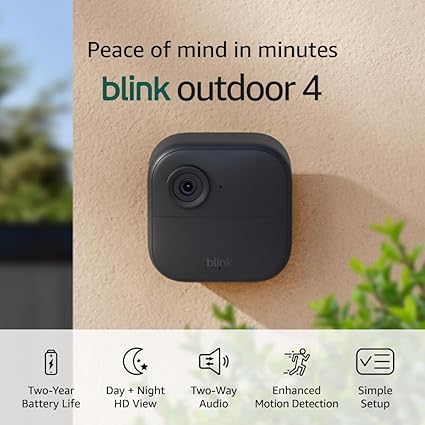
Short Verdict: This is the “cover everything” option. Three wireless cameras, two-year battery life, no drill-and-wire required. The problem is you’re paying a premium price for a system that wasn’t designed specifically with dogs in mind — and local storage requires an additional purchase.
Best For: Dog owners with yards, large properties, or multi-zone setups where you want indoor and outdoor coverage. Think: dog door users who want to see if the dog snuck out to the yard.
Skip It If: You only need to watch one room indoors. Paying this much for a fixed-angle indoor dog monitor is over-buying. Also skip if you want free local storage — the Sync Module Core included here does not include local storage capability.
What Buyers May Regret: The subscription situation is the part people miss before buying. No local storage comes included with this bundle. Cloud clip storage requires a Blink Subscription Plan. One reviewer specifically called this out: a returned unit came with disappointment about the storage situation. Buyer feedback mention 1,162 video quality mentions — mostly positive — but connectivity complaints show up notably.
Complaint Pattern: Connectivity issues and the subscription/storage gap are the main gripes. One reviewer titled their review “Constant connectivity issues.” That said, the majority of video quality feedback appears positive, and the battery life claim holds up in customer reports.
Pros:
- Wireless — genuinely no wires to run
- Claimed 2-year battery life with included Energizer lithium AAs
- Three cameras in one purchase covers a home meaningfully
- Dual-zone enhanced motion detection with person detection
- Outdoor-rated, so usable in dog runs or yards
- Two-way audio via the app
Cons:
- Sync Module Core does NOT include local storage — that requires a different Sync Module 2 + USB drive
- Cloud storage requires ongoing subscription
- Premium pricing for a bundle that needs more accessories to be fully functional
- Fixed angle only — no pan/tilt
- Not dog-specific
Expert Tip: If you’re buying this for dog monitoring and don’t want a subscription, immediately add the Sync Module 2 to your cart — the Core version in this bundle doesn’t support USB local storage. Without that upgrade, you’re subscribing or getting nothing recorded.
4. Blink Mini Pan-Tilt Camera — Best Compact Pan/Tilt for Alexa Households

Short Verdict: Small, capable, and surprisingly affordable for a full-rotation indoor camera. If you’re already in the Alexa ecosystem, it integrates cleanly. The mechanical pan/tilt is the thing that will determine long-term satisfaction.
Best For: Small apartments, single-room monitoring, Alexa smart home users, and budget buyers who specifically want rotation coverage without the Kasa/Tapo app ecosystem.
Skip It If: You’ve had bad luck with motors before and need something to last three-plus years without failure. Also skip if you’re not willing to think about a Blink subscription at some point.
What Buyers May Regret: The pan/tilt mechanism. Buyer feedback specifically call out that “some report it stops working” with the rotating feature. That’s a mechanical component that lives or dies based on usage frequency. If you’re spinning this camera around constantly, it’s working that motor hard.
Complaint Pattern: Three distinct issue areas surface: pan/tilt reliability, connectivity/Wi-Fi drops, and questions about value if you don’t subscribe to anything. The camera works without a subscription for live view; recorded clips require either a Blink plan or a Sync Module 2 with USB drive (sold separately).
Pros:
- Genuine 360° horizontal and vertical tilt coverage
- HD day and infrared night vision
- Two-way audio for talking to your dog
- Works well with Alexa voice commands and Echo Show devices
- Competitive price for a pan/tilt model
- Real-time motion alerts pushed to your phone
Cons:
- Pan/tilt motor failure reported in customer base — a real long-term risk
- Recording requires subscription or separately purchased Sync Module 2
- Connectivity reliability issues noted
- Not a dog-specific camera — no bark detection or treat dispensing
Expert Tip: If you’re using this primarily as a dog camera, set motion sensitivity to medium rather than high. Dog movement, especially wagging tails and pacing, can trigger constant alerts that desensitize you to the feed. Medium sensitivity catches meaningful movement without pinging your phone every 90 seconds.
5. Furbo 360° Dog Camera — Best Purpose-Built Dog Camera (If You’ll Pay the Subscription)

Short Verdict: The only camera in this roundup built exclusively for dogs. Bark alerts, unusual activity notifications, treat tossing, and AI designed around dog behavior. Also the only camera here that requires a paid subscription before a single feature works.
Best For: Separation anxiety dogs, owners who travel regularly, multi-dog households where behavioral monitoring matters, and people who want more than a passive video feed.
Skip It If: You’re not willing to commit to an ongoing monthly or yearly subscription. The product listing is explicit: the camera is bricked without an active paid plan. Zero features are accessible before activation. This is not a one-time purchase.
What Buyers May Regret: The subscription math. The activation fee structure is layered — there’s a monthly plan with an upfront activation fee, or a yearly plan where the activation fee is waived. Buyer feedback are light (the “customers say” section is notably sparse compared to other products here), which makes independent financial evaluation harder. What’s clear: this is the most total-cost-of-ownership product on this list.
Complaint Pattern: Based on available review signals, satisfaction is high among buyers who went in knowing the subscription model. The one “4 out of 5” review mentions “nice but also some bad” — likely referencing the subscription constraint. The treat toss and dog-specific alerts appear to drive genuine owner enthusiasm.
Pros:
- Purpose-built for dogs — not a repurposed security camera
- Bark alerts and unusual activity detection powered by AI
- Rotating treat toss is a functional engagement tool for anxious dogs
- 2-way audio with speakers designed to project dog-friendly tones
- 360° rotation covers the full room
- Dog safety monitoring alerts (not just generic motion)
Cons:
- Mandatory subscription — camera literally doesn’t work without it
- Ongoing cost makes total spend significantly higher than alternatives
- Activation fee structure adds upfront financial friction
- Treat toss + subscription = ongoing expense for what other cameras do cheaper (minus the treats)
Expert Tip: If you’re buying this for a dog with diagnosed separation anxiety, discuss the treat-dispensing plan with your vet or a certified dog behaviorist before your first session. Randomly tossing treats remotely can either help anxiety or inadvertently reinforce anxious behavior patterns, depending on timing. The camera’s bark-detection trigger is powerful — but when and whether to respond with a treat is a training question, not just a tech question.
6. Ring Indoor Cam (Like-New/Certified Refurbished) — Best Value for Ring Ecosystem Owners

Short Verdict: A genuinely well-reviewed refurbished camera in the Ring ecosystem. If you already have Ring devices, this slots in seamlessly. If you’re starting fresh, think carefully before building around one ecosystem.
Best For: Existing Ring users adding dog monitoring to an established setup, value seekers who want reliable brand-name quality at a refurbished price point.
Skip It If: You don’t have any other Ring devices — the real value here is ecosystem continuity. Also skip if you want pan/tilt; this is a fixed-angle camera. And remember: Ring’s full feature set also benefits from a Ring Protect subscription for cloud storage.
What Buyers May Regret: The “like-new” framing. While buyer feedback are strongly positive — “indistinguishable from new,” “works like new” — connectivity issues show up in the feedback. Some buyers report inconsistent Wi-Fi behavior, which is harder to diagnose on a refurbished unit when you’re not sure if it’s the hardware or your network.
Complaint Pattern: Connectivity is the recurring watch point. Camera functionality and setup speed get strong praise. Packaging comes in generic Amazon-branded boxes (not original Ring packaging), which is expected but worth knowing if you’re gifting it.
Pros:
- Certified refurbished with same limited warranty as new device
- 1080p with Color Night Vision — better nighttime image than infrared-only cameras
- Advanced Pre-Roll captures seconds before a motion event — great for seeing what triggered the alert
- Manual Privacy Cover (physical, not software-only) — real privacy control
- Very high aggregate rating (4.7) for a refurbished product
- Integrates into Ring ecosystem natively
Cons:
- Fixed angle only — dog leaves the frame and you’re watching empty floor
- Connectivity inconsistency noted in customer feedback
- Full cloud recording requires Ring Protect subscription
- Comes in generic box — fine functionally, not great for gifting
Expert Tip: Use the Advanced Pre-Roll feature specifically for dog monitoring — it records the few seconds before the motion trigger fires. For dogs who do weird, troubling things (counter-surfing, getting into the trash, escaping a baby gate), this is the feature that actually catches the crime, not just the aftermath.
7. TP-Link Tapo C200 — Best Step-Up from the C100 for Roaming Dogs

Short Verdict: Think of this as the C100 that grew up. Same ecosystem, same budget-friendly price band, but with pan/tilt coverage added. One of the highest review counts in this roundup at nearly 41,000 — that’s a well-tested product.
Best For: Dog owners who tried or almost bought the C100 but realized they needed room-wide coverage. Also ideal for owners whose dog has free roam of a main living area.
Skip It If: You want color night vision (this uses infrared — good, but black-and-white at night). Or if you need outdoor coverage — this is an indoor camera.
What Buyers May Regret: Long-term reliability. Buyer feedback specifically call out “stops working” as a recurring concern, separate from just connectivity drops. That’s a harder problem — a camera that loses Wi-Fi can be rebooted, but a camera that stops functioning requires a return. With nearly 41,000 reviews at a 4.5 rating, the majority experience is positive, but that tail exists.
Complaint Pattern: Two distinct areas: reliability (units that stop working after extended use) and connectivity (Wi-Fi drops). These are also the two most common complaints across the entire budget camera category, suggesting this is as much a category-wide issue as a Tapo-specific one.
Pros:
- 360° horizontal and 114° vertical tilt — wide room coverage
- 1080p video with clear night vision (infrared, 30ft range)
- No subscription needed for basic live view and alerts
- Extremely well-reviewed for the price (40,977 reviews, 4.5 stars)
- Works with Alexa and Google Home
- MicroSD and cloud storage both supported
- Multiple reviewers specifically mention dog and pet monitoring success
Cons:
- Infrared night vision (black and white) vs. color night vision on pricier options
- Long-term reliability concerns in customer feedback
- 2.4GHz only
- No dog-specific features (bark alerts, treat dispensing, etc.)
Expert Tip: Set the C200’s motion detection zone to exclude areas with high passive movement — ceiling fans, curtains near vents, windows. Tapo’s app lets you draw custom detection zones. This dramatically cuts down on false-alert fatigue and makes the actual alerts meaningful when your dog is doing something interesting.
8. Eufy E30 4K Indoor Camera — Best for Clarity-Obsessed Owners and HomeKit Users
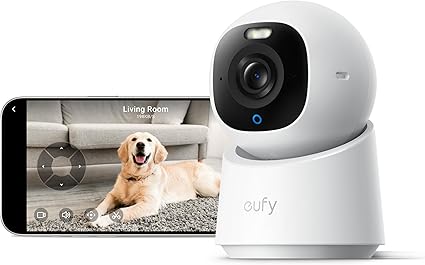
Short Verdict: The highest-resolution camera in this roundup, no subscription required, with Apple HomeKit support — a combination that’s genuinely rare at a mid-range price. If you want to actually see what your dog is doing (is that a rash? did he eat something? is he limping?), 4K makes a difference.
Best For: Detail-focused owners, Apple ecosystem households, dogs with health concerns where video clarity matters, and anyone who hates subscription fees but wants premium image quality.
Skip It If: You’re on an extremely tight budget or you don’t care about resolution differences. Also worth noting: this is a newer product with a smaller review base (~2,285 reviews), so long-term durability data is less established than the Tapo C200 or Kasa EC70.
What Buyers May Regret: Storage planning. 4K recording generates significantly larger files than 1080p. If you’re relying on local MicroSD storage, you’ll need a higher-capacity card and you’ll cycle through footage faster. One review from Mexico specifically flagged storage requirements as a notable constraint. Budget for at least a 128GB or 256GB card.
Complaint Pattern: Buyer feedback here are notably positive and thin — “one of the best indoor cameras” is the main signal. With only 2,285 reviews, complaint patterns aren’t as clearly established. The one 4-star review from the sample mentions “fantastic resolution, feature rich, easy setup” — that’s a strong soft signal, but watch the review base grow before treating it as fully proven.
Pros:
- 4K recording — highest resolution in this group by a significant margin
- AI-powered auto tracking follows your dog around the room
- 24/7 continuous recording with color night vision
- No subscription required — store locally or use cloud storage
- 360° pan with Quick Focus Tap and Panoramic View in app
- Apple HomeKit compatibility — genuinely rare in budget-to-mid-range cameras
- Two-way audio
Cons:
- Newer product with smaller review footprint — less proven over time
- 4K storage requirements are substantial — plan for large-capacity microSD
- Mid-range priced (not the cheapest option here)
- HomeKit requirement means you’ll need to be in the Apple ecosystem to use that feature
Expert Tip: If you’re using this to monitor a dog with a medical condition or post-surgical recovery, zoom in on the 4K footage rather than watching it at standard size. The resolution lets you meaningfully inspect skin conditions, incision sites, or limb movement that would be blurry noise on a 1080p camera. Keep it pointed at the dog’s bed or recovery area and let AI tracking handle the rest.
9. Roku Indoor Camera 2-Pack — Best for Roku TV Households

Short Verdict: The wild card in this roundup. Wi-Fi 6, color night vision, and a 2-pack at a mid-range price — on paper, this looks like exceptional value. The Roku ecosystem integration is real and genuinely convenient if you already own a Roku TV. The connectivity complaints are also real.
Best For: Roku TV owners who want to pop a camera feed onto their TV without buying a separate display or app-hopping. Also useful for two-room dog monitoring (separate the pair — one in the dog’s room, one in the living room).
Skip It If: You don’t already own a Roku device. The best features of this camera are its Roku ecosystem integration; without that context, you’re buying a camera with mixed reliability signals when there are better-proven options at similar prices. Also skip if you need pan/tilt — these are fixed-angle.
What Buyers May Regret: Connectivity. “Unreliable connectivity. Trouble with Roku TV channel & cameras” is a direct quote from a sample review. Buyer feedback specifically highlight frequent disconnections. For a camera you’re relying on to monitor an anxious dog at home, a camera that drops offline intermittently is more than a nuisance — it’s a failure condition.
Complaint Pattern: Connectivity and disconnects are the primary issue, echoed across customer feedback. Audio quality gets mixed reviews. The motion detection and siren feature get more praise than complaints, with the siren loudness specifically noted positively. Some users also report general reliability issues (“stops working”).
Pros:
- Wi-Fi 6 support — better network performance in congested environments
- Color night vision (full color, not just infrared black-and-white)
- 2-pack provides meaningful home coverage for the price
- Seamless integration with Roku TVs — pop the feed on the big screen
- Works with Alexa and Google Home
- 1080p HD with WDR for better daylight clarity
Cons:
- Fixed angle — no pan/tilt
- Connectivity reliability issues documented in customer feedback
- Audio quality described as mixed
- Full value depends on Roku ecosystem ownership
- Overall review count is lower (~2,851) compared to top competitors
Expert Tip: One reviewer specifically noted “Make sure to use the 2.4 GHz network!” — this is a hard requirement. Even though these cameras support Wi-Fi 6, they still need the 2.4GHz band, not 5GHz. If your router broadcasts both on the same SSID (common in mesh systems), force-split them or connect the cameras to a dedicated 2.4GHz SSID to avoid intermittent drops.
10. Amazon Echo Show 5 — Best Smart Display for Occasional Dog Check-Ins (Not a Dog Camera Replacement)

Short Verdict: The Echo Show 5 is not a dog camera. It belongs on this list because it’s the best companion device for dog cameras — a bedside or desk display that lets you say “Alexa, show me the living room camera” and actually see your dog without unlocking your phone. Buying it instead of a camera is the mistake to avoid.
Best For: Dog owners who already have or plan to buy a compatible camera (Blink, Ring, Wyze, Kasa, Tapo, and others all work via Alexa) and want a dedicated, always-on display for their home. Also useful for people who want to check in on their dog first thing in the morning without phone interaction.
Skip It If: You don’t have or plan to get a compatible Alexa camera. The Echo Show 5 has a small built-in camera for video calls, but it’s not a pet monitoring camera — it can’t pan, has no motion alerts for pet movement, and won’t push notifications when your dog misbehaves.
What Buyers May Regret: Expecting it to replace a dedicated camera. Buyer feedback are notably mixed on responsiveness: some users report Alexa doesn’t respond reliably to commands, and slowness to respond is a recurring complaint. If you’re trying to pull up a dog camera feed quickly because you heard a crash noise, a laggy voice assistant is a frustrating experience.
Complaint Pattern: Responsiveness and reliability are the most common issue themes — Alexa misses commands, the device is slow to react. Sound quality gets genuinely mixed reviews (some praise the updated bass; others say it doesn’t “hear” commands well). Value perception is split along those same lines.
Pros:
- 5.5" display makes camera feeds genuinely viewable — better than a phone for at-a-glance checking
- Works as a hub for compatible cameras — say “show me the dog” and it appears on screen
- Compact footprint — fits on a nightstand or desk without dominating the space
- Doubles as a speaker, alarm, and smart home controller
- New model has improved bass and clearer vocals
- Good for video calls with family when you’re away from home
Cons:
- Not a dog camera — no motion alerts, no pan/tilt, no bark detection
- Voice responsiveness issues documented across customer feedback
- Camera view depends entirely on having a compatible camera already
- Privacy consideration: always-on mic and camera in home
- Mixed sound quality signals in customer feedback
Expert Tip: Place the Echo Show 5 in the room where you most commonly want to check your dog — bedroom, home office, kitchen. Pair it with a Blink or Ring camera in the dog’s space, then add those cameras to your Alexa routines. You can set up a visual notification that surfaces the camera feed on the Show whenever motion is detected — so you don’t even need to ask; it just shows you.
Final Summary: Match the Camera to Your Real Situation
You have a puppy and want basic oversight without spending much: Start with the TP-Link Tapo C200. It’s pan/tilt, no subscription, enormous review base, and will cover a full room. The C100 works too if your pup has one spot.
Your dog has separation anxiety and you want to actively engage: Furbo 360° is built for exactly this — but run the subscription math first. Three months minimum at the monthly rate, or commit to the annual plan. If treat-tossing and bark alerts matter to you, no other camera on this list does that.
You want the clearest possible image to monitor a dog recovering from surgery or with a health condition: Eufy E30. The 4K resolution lets you actually inspect what you’re looking at. Pair it with a large-capacity microSD card and skip the subscription entirely.
You have a Roku TV and want the simplest possible check-in experience: Roku Indoor Camera 2-Pack lets you pop the feed on your TV with zero app-switching — just plan for potential connectivity frustration and use 2.4GHz exclusively.
You already own Ring or Blink devices: Buy into your own ecosystem. Ring Indoor Cam (refurbished) extends a Ring setup affordably. Blink Mini Pan-Tilt adds room-sweep coverage to a Blink household without wiring.
You want a no-subscription outdoor + indoor solution for dogs with yard access: Blink Outdoor 4 3-pack covers multiple zones and runs on batteries for two years — just budget for the Sync Module 2 upgrade if you want local storage.
You’re building a smart home hub around dog monitoring: Amazon Echo Show 5 + a compatible camera is the pairing to make. The Show becomes your always-on monitoring display; the camera does the actual watching.
Whatever you choose: put your camera on your router’s 2.4GHz band, position it where your dog actually spends time, and test the motion sensitivity before you leave the house for work. The cameras that get returned almost always come down to those three things getting skipped at setup.